
Last updated: November 23, 2026. Payment and platform details checked against Zelle, Venmo, Meta and FTC guidance in November 2026.
You listed something on Facebook Marketplace and a buyer messages within minutes. They love it. They’ll pay your asking price. There’s just one catch: they can’t pick it up, so could you ship it?
It sounds completely reasonable. It’s also exactly how one of the most common Marketplace scams begins.
That’s the seller side. Buyers get targeted too. This guide covers both sides of Facebook Marketplace scams: fake buyers who go after sellers, fake sellers who go after buyers, and the payment tricks (including Venmo and Zelle) that catch both. You’ll also find what to do if it has already happened, including how to report the scammer and try to get your money back.
If you’re reading this because it has just happened, take a breath. You haven’t done anything silly. These scams are built to feel normal, and they catch careful people every day. Let’s take it one step at a time.
The FTC says people reported losing more money to scams that started on Facebook than on any other social media platform in 2025, and social media scams overall cost Americans $2.1 billion. FTC data spotlight, April 2026
Disclosure: Some links on this page are affiliate links. If you buy through them, we may earn a small commission at no extra cost to you. As an Amazon Associate, we earn from qualifying purchases.
1. How the Facebook Marketplace Shipping Scam Works
Quick answer: In the Facebook Marketplace shipping scam, a fake buyer says they can’t pick up your item, “pays” with a fake receipt or an overpayment, and rushes you to ship. The payment never arrives. Protect yourself by selling for cash on pickup, and ship only after the money has cleared in your own account.
This scam targets sellers. It swaps a simple local pickup for a fake shipping arrangement, which gives the scammer time and distance to take your item, your money, or both.
It feels legitimate because the “buyer” is polite, keen and happy to pay full price. Here’s how it usually plays out.
- They message almost straight away. Something like “Hi, is this still available?” Scammers watch new listings and move fast on purpose.
- They can’t collect in person. They’re interstate, buying a gift, in the military or just too busy. Whatever the story, shipping becomes the only option.
- They ask you to leave Facebook. They want your number, or suggest WhatsApp or email. Once you’re off the platform, you lose its fraud tools.
- They “pay,” but the payment isn’t real. Often it’s a fake payment email or a doctored screenshot with the right amount and your name on it.
- They push you to ship right now. It’s a birthday gift, or they’re travelling, or the payment “will expire.” The urgency is deliberate.
- The item is gone and the money never arrives. The payment doesn’t clear, or the buyer disappears.
Once the item has been delivered and the payment turns out to be fake, there’s very little Facebook can do. That’s why spotting it early matters so much.
2. 5 Red Flags of Facebook Marketplace Scam- Buyers
Quick answer: The biggest red flags of a scam buyer are an instant message, a push to leave Messenger, an offer to overpay, a payment screenshot instead of real money in your account, pressure to ship fast, and a brand-new profile. Any one of them is a reason to pause.
Here’s what should make you pause.
Red flag 1: They want to leave Facebook Messenger
There’s no good reason to move to WhatsApp, text or email before a deal is agreed. Staying on Messenger keeps Facebook’s fraud detection working for you.
Red flag 2: They offer to pay more than you’re asking
No genuine buyer does this. It’s the classic overpayment trick: they “accidentally” send too much, ask you to send the difference back, and the original payment never really existed (or later gets reversed).
Red flag 3: They send a payment email or screenshot
These are easy to fake and can look completely real. Never trust an email or screenshot. Log into your actual bank or payment app and check the money is there.
Red flag 4: They rush you to ship
“I need it today.” “Please post it this afternoon.” Pressure is designed to stop you thinking clearly. Real buyers understand shipping takes time.
Red flag 5: Their profile looks brand new or empty
This is my go-to check. If the profile was created this year, has no friends or has hardly any activity, I don’t engage. A missing photo, or a name that doesn’t match the picture, are also signs of an account made just for scamming.
3. Venmo, Zelle and Fake Payment Scams on Marketplace
Quick answer: Zelle, Venmo and PayPal scams on Marketplace all work the same way: you’re made to believe money has arrived, or you’re talked into sending real money back. Zelle says there is no account upgrade to pay for, and you should never refund an “overpayment.” Check your own account first.
Most seller scams come down to one trick: making you believe money has arrived when it hasn’t, or getting you to send real money back. Here are the versions to know.
The fake “payment pending” email
You get an email that looks like it’s from PayPal, Venmo, Zelle or your bank. It says the buyer has paid and the funds are “pending” until you ship.
Real payment apps don’t hold your money until you post an item. If you can’t see the money in your own app or bank account, you haven’t been paid.
The overpayment refund
The buyer “accidentally” sends too much, or says a fee was added, and asks you to send the difference back. You send real money. Their payment then bounces, gets reversed, or was never real.
If anyone overpays and asks for money back, treat it as a scam. There’s no honest reason for it.
The Zelle “business account upgrade” scam
The Better Business Bureau has warned about this one. The buyer says they paid from a Zelle “business account.” You then get an email, supposedly from Zelle, saying you must upgrade your own account to receive the money.
The fix they offer: the buyer sends you a few hundred dollars extra to cover the upgrade, and you refund it. You send real money. The buyer disappears.
Zelle’s own online marketplace scam guidance warns about fake account-upgrade emails, and Zelle says there is no upgrade to pay for. If a message says otherwise, it isn’t real. Also watch for lookalike email addresses that mimic a payment app but aren’t the real one.
The Venmo reversal
Venmo and similar apps can reverse a payment if it was funded with a stolen card, or if a buyer files a dispute. A scammer may “pay” you, collect your item, and then have the payment pulled back.
Venmo’s Purchase Protection applies only to eligible payments, such as those a buyer tags as a purchase or sends to a business profile. Sellers pay a fee of 2.99% per transaction on those. Payments sent without the purchase tag aren’t covered at all, and scammers will often ask you to skip it. Venmo’s eligibility rules also exclude items collected in person, so using Venmo for a local pickup gives you no safety net. Fees and rules change, so check Venmo’s current terms.
The Three-Check Rule: Cleared, Confirmed, Checked
Before you ship anything, or send a cent back to a buyer, run these three checks:
- Cleared: the money has fully cleared, not just “pending.”
- Confirmed: you’ve seen it in your own banking or payment app, not in an email or screenshot.
- Checked: you’ve looked at the buyer’s profile and their story hangs together.
If any check fails, you wait. A genuine buyer will wait too.
The FTC gives sellers similar advice in its guide to avoiding online selling scams: don’t accept a mobile payment from someone you don’t know, don’t deposit a check for more than your selling price, and don’t share verification codes.
4. How Safe Is Each Payment Method?
(A Quick Cheat Sheet for Sellers)
| Payment method | Risk to you as a seller | What to know |
|---|---|---|
| Cash at pickup | Lowest | Hand over the item as you take the cash. Check the notes. |
| Facebook checkout (US, shipped orders) | Lower | Protections apply to eligible checkout orders, with conditions. Not available in every country. |
| PayPal Goods and Services | Medium | Seller protection may apply with tracking and delivery to the order address. Check current terms. |
| Venmo (tagged as a purchase) | Medium | Protection applies only to eligible payments, with a 2.99% seller fee. Items collected in person aren’t eligible. |
| Bank transfer | Medium to high | Check it has cleared in your own banking app. Never refund overpayments. |
| Zelle, Cash App, Friends and Family | High | Treat these like cash. They’re usually hard to reverse and offer little protection. |
| Gift cards, wire transfers, anything unusual | Very high | Walk away. |
A note for Australian and UK sellers: Facebook’s shipped checkout and its protections are mainly a US feature. If you’re selling outside the US and a buyer wants shipping, you’re relying on the payment method alone, which makes local pickup and cash even more important.
5. What to Say to a Suspicious Buyer
You don’t have to be rude, and you don’t have to explain yourself. Here are simple replies you can copy.
- If they can’t collect: “Thanks for your interest. I’m only selling for local pickup with cash.”
- If they want to move off Facebook: “I keep all my sales on Messenger, so I’m happy to chat here.”
- If they send a payment screenshot: “Thanks. I’ll arrange the next step once the money shows in my account.”
- If they overpay and ask for a refund: “I can’t refund anything. If you’d like, send the right amount and I’ll post it after it clears.”
- If they push you to hurry: “No rush on my end. I’ll check my account and get back to you.”
Then watch how they respond. Genuine buyers say “no problem.” Scammers push harder, and that’s your answer.
6. Fake Sellers: 7 Red Flags for Buyers
Quick answer: The biggest red flags of a fake Marketplace seller are a price far below normal, a request for money before you’ve seen the item, a push to leave Messenger, a payment method you can’t undo, an excuse for why you can’t see the item in person, a thin profile, and pressure to decide fast. Any one is a reason to stop.
Sellers get most of the attention in Marketplace scam stories, but buyers lose money too. Here’s what to watch for.
Red flag 1: The price is too good
If an expensive item is listed for very little, it might be fake. That’s the FTC’s own warning about online marketplaces. FTC
Before you message, search for what the same item sells for elsewhere. A big gap isn’t a bargain. It’s bait.
Red flag 2: They want money before you’ve seen the item
A “deposit to hold it.” Half upfront. Full payment now, pickup later. Once you’ve paid, the listing disappears.
The item is the only thing that proves it exists, so see it first.
Red flag 3: They want to leave Messenger
Meta says a buyer or seller who asks you to continue by phone or email, especially early in the chat, may have ill intent. It adds that these off-platform scams are most common in vehicle, rental and home goods listings. Meta
Moving to WhatsApp is the same trick. (See our guide to the latest WhatsApp scams.)
Red flag 4: They ask for a payment you can’t undo
Gift cards, wire transfers, crypto, Zelle. Scammers choose these because once the money is sent, it’s very hard to get back. Chase lists cash, checks, crypto, gift cards, wire transfers and Zelle among payment types with no purchase protection. Chase
The FTC adds that scammers tell you to pay a particular way and pressure you to hurry. FTC
Red flag 5: They can’t meet or show you the item
They’re “overseas,” “deployed,” “away for work,” so a courier will deliver it once you’ve paid. It’s the same story every time.
Ask for a short live video of the item with today’s date on a piece of paper next to it. A real seller can do that in two minutes. A scammer will have an excuse.
Red flag 6: The profile looks thin
A new account, few friends, no history, or photos that look too polished. Right-click a photo (or use Google Lens) to see if it appears elsewhere online. A stolen photo is a quick way to expose a fake listing.
Red flag 7: They hurry you
“Someone else is about to buy it.” “Pay now so I can hold it.” Pressure is there to stop you checking.
What it looked like when it happened to me
I’ve been on the buying side of this too. I asked a seller for a time to view the item before I paid. She kept insisting I send a deposit so she could “hold” it for me.
I said no. I wasn’t paying for something I hadn’t seen.
She agreed to a viewing time the next day. When I messaged to confirm before heading over, she didn’t answer. So I looked at her profile. It was only a month old.
That was enough for me. I never followed up.
I can’t say for sure what she was doing, but the pattern fit: pressure to pay first, a viewing time that never happened, and a brand-new profile. I’ve had a couple of other sellers ask for 50% upfront, and their profiles were recent too.
The lesson I took from it is simple. A seller who won’t let you see the item first, and who’s also new on Facebook, isn’t worth the risk. There’s always another listing.
Before you message anyone, check when they joined.
Facebook Marketplace rent scams
Fake rental listings are one of the most common Marketplace scams. The scammer copies photos of a real property, lists it cheaply, and asks for a deposit or application fee before you’ve seen it. The FTC’s analysis of fake rental listing reports found about half were posted on Facebook. FTC
To stay safe:
- See the place in person before you pay anything or sign anything.
- Be wary of rent that’s far below similar listings nearby.
- Don’t pay a deposit by Zelle, wire transfer, gift card or crypto. None of them give you protection.
- Check who actually owns or manages the property. Ask for proof and confirm it independently.
- Search the listing photos. If they appear on another site under a different address, it’s a scam.
For more, see the FTC’s data spotlight on rental scams.
Two categories to treat with extra care
- Rentals. The FTC’s analysis of fake rental listing reports found about half were posted on Facebook. Don’t pay a deposit, application fee or sign anything until you’ve been inside the place yourself. FTC
- Vehicles. Don’t pay until you’ve checked the vehicle’s history and had it inspected by someone independent. Never pay a “deposit” to a stranger to hold a car.
7. Scammed on Facebook Marketplace?
If you’ve been scammed as a seller, stop contacting the buyer, screenshot everything, then call your courier to try to intercept the parcel and your bank or payment provider about any money you sent. Report the buyer to Facebook and your national fraud agency afterwards. The first 24 hours matter most.
Acting fast makes a real difference. Work through these steps in order.
Step 1: Stop all contact
Don’t reply, argue or try to get your item back by messaging them. More contact only gives them more chances to manipulate you.
Step 2: Screenshot everything first
Before you report anything, save screenshots of the listing, the scammer’s profile, the Messenger conversation, payment receipts and tracking details. Scammers often delete their accounts the moment they’re reported.
Step 3: Don’t ship if you haven’t yet
If you haven’t posted the item, don’t. Log into your real bank or payment account and check the money has actually arrived.
Step 4: Call your courier if the parcel is on its way
If you’ve already posted it, contact your courier straight away (USPS, UPS or FedEx in the US; Australia Post or others in Australia) and ask whether they can intercept or redirect the parcel. It isn’t always possible, but the first 24 hours give you the best chance.
Step 5: Contact your bank or payment provider
If real money moved, this is your best chance of recovering it. What to do depends on how it moved:
- Bank transfer: Call your bank’s fraud line (use the number in your banking app or on your card, not one from a message). Ask them to place a hold if it hasn’t cleared and to send a recall request.
- Credit or debit card: Ask about a chargeback.
- PayPal Goods and Services: Open a dispute in the Resolution Centre within 180 days.
- Venmo, Zelle, Cash App and similar: Contact their support right away and be realistic about the outcome, since these offer very little protection.
- If you sent a refund for an “overpayment”: Call your bank at once and ask them to try to recall it. The buyer’s payment was never real, so that refund is the money you lost.
Acting within the first 24 hours gives you the best odds. Recovery is never guaranteed.
If you’re the buyer who was scammed
The order is the same, but the money moves the other way.
- Stop contact and screenshot everything. The listing, the seller’s profile, the chat and your payment receipt.
- Card or PayPal Goods and Services: dispute the charge straight away.
- Bank transfer: call your bank’s fraud line using the number in your banking app and ask for a recall.
- Zelle, Venmo, Cash App: contact the app and your bank right away. Be realistic about the outcome.
- Report the seller on Facebook (open the listing, tap the seller’s name, tap the three dots and choose Report). Menus change, so follow what you see.
- Report to the authorities with the FTC, Scamwatch or Action Fraud, as in your existing reporting section.
8. How Safe Is Each Payment Method? (A Cheat Sheet for Buyers)
Quick answer: As a buyer, the safest payment is cash when you’re holding the item. For anything shipped, a credit card or PayPal Goods and Services gives you a route to dispute. Zelle, Cash App, wire transfers and gift cards give you almost none.
No legitimate seller needs you to pay with a gift card.
Here’s the same idea as your seller table, flipped for buyers.
| Payment method | Risk to you as a buyer | What to know |
|---|---|---|
| Cash at pickup | Lowest | Check the item first, then pay. You hand over the cash as you take it. |
| Facebook checkout (US, shipped orders) | Lower | Protections apply only to eligible orders paid through checkout. Check Meta’s current terms. |
| Credit card or PayPal Goods and Services | Medium | You can dispute a charge if the item never arrives or isn’t as described, within the provider’s time limits. |
| Bank transfer | High | Hard to reverse. You’d rely on a recall request, which isn’t guaranteed. |
| Venmo, Zelle, Cash App | High | Treat these like handing over cash. Chase says Zelle has no purchase protection. |
| Gift cards, wire transfers, crypto | Very high | Walk away. |
7. How to Report a Facebook Marketplace Scam
Quick answer: To report a Facebook Marketplace scam, open the scammer’s profile, tap the three dots, choose Find support or report, then Scam or fraud. Report the listing and the Messenger chat too, then file a report with the FTC, Scamwatch or Action Fraud. Reporting protects others but rarely recovers money.
Reporting protects other people, and it creates a record. Do all three of these on Facebook if you can. Each one helps the account get removed faster.
Report the profile
- Go to the scammer’s Facebook profile.
- Tap the three dots (•••) near the top.
- Choose Find support or report.
- Choose Scam or fraud and follow the prompts.
Report the listing or conversation
- For a listing, tap the three dots on it and choose Report listing.
- For the chat, open the Messenger conversation, tap their name at the top, scroll down and tap Report, then choose Scam or fraud.
Facebook’s menus change from time to time, so follow what you see on screen. Meta keeps its own guides on Marketplace safety and how to report scams up to date.
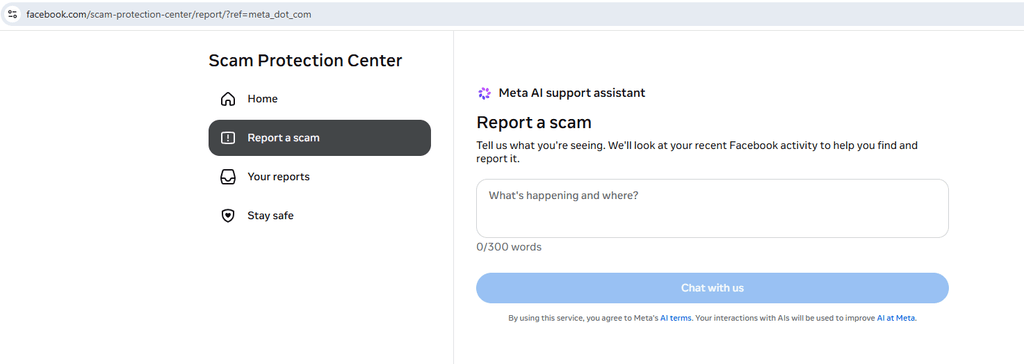
What to expect: Facebook reviews reports but doesn’t always tell you the outcome. Reporting is about protecting others. Getting money back happens through your bank or payment provider.
Report it to the authorities
It takes about ten minutes, costs nothing and helps protect other people.
- United States: reportfraud.ftc.gov. For larger losses, also report to the FBI’s IC3.
- Australia: Scamwatch, run by the ACCC. If you lost a large amount or your identity details were exposed, also report through ReportCyber and consider contacting the Australian Federal Police.
- United Kingdom: Action Fraud.
Should you call the police? If you lost a significant amount, your identity details were stolen, or you know who the scammer is, yes. A police report also creates a record that can support bank disputes and insurance claims.
8. What If Facebook Won’t Help?
This is really common, and it’s frustrating. Facebook can only do so much when a deal happened outside its platform. Here’s what else you can try.
- Use Facebook’s Help Centre. Search for “marketplace scam” at facebook.com/help.
- Try a card chargeback. If you paid by card, even through a payment app, a chargeback bypasses Facebook entirely.
- Contact a consumer protection agency. In the US, your state attorney general’s consumer protection office. In Australia, Consumer Affairs Victoria, NSW Fair Trading or your state’s equivalent.
- Contact AFCA (Australia). If your bank hasn’t handled your fraud claim properly, the Australian Financial Complaints Authority may be able to help.
- Keep your documents. Screenshots and receipts support every report and dispute you file.
9. Protect Yourself From Further Damage
Reporting is only half the job. Depending on what you shared, your risk may go beyond this one sale.
If you shared your phone number: Expect more scam calls and texts, because scammers sell contact lists. If you start getting verification codes you didn’t ask for, call your phone provider right away. It can be an early sign someone is trying to take over your number.
If you shared your home address: Watch for missing mail and unexpected letters.
If you shared ID documents such as a licence, passport, Medicare card or Social Security number: This is the most serious case. Contact the issuing authority straight away. In the US, report identity theft at identitytheft.gov. In Australia, contact Services Australia for Medicare, your state roads authority for a licence, and the Australian Passport Office for a passport.
If something feels off with your accounts: Our guide on how to tell if your phone has been hacked shows you how to check quickly.
An identity monitoring service like Aura can watch your personal information and alert you if it shows up somewhere it shouldn’t, including on the dark web. It won’t undo what happened, but it gives you early warning.
10. How to Sell Safely on Facebook Marketplace
Most Marketplace deals are completely fine. A few simple habits protect you from nearly all the scams.
- Stick to local pickup. Cash on pickup stops almost every shipping scam in one step. If someone won’t collect and insists on shipping, ask yourself why.
- Stay on Messenger. Don’t move to WhatsApp, text or email before the deal is done.
- Never trust a payment email or screenshot. Check your real account.
- Never send money back. Not for overpayments, not for “fees,” not for “upgrades.”
- Check the profile. New, empty or mismatched profiles are a reason to stop.
- Use checkout where it’s available. In the US, Facebook’s checkout protections only apply to eligible orders paid through it.
- Trust your gut. There will always be another buyer. There isn’t always a way to get your item back.
My own rule as a buyer
I’ve been on the buying side of this too. I’ve had sellers ask me to pay the full amount, or at least half, upfront “to hold the item,” with a promise of a refund if I didn’t like it in person. I’m sure many of you have met this seller.
My rule is simple: you pay with one hand and take the item with the other. No exceptions.
It might mean missing out on something genuine now and then. But I’ve never lost money to a scammer, and that trade-off works for me.
11. Facebook Marketplace Scams in Australia
Australians are targeted often. A strong secondhand culture on Marketplace and Gumtree makes Australian sellers attractive to overseas scammers working at scale.
The ACCC’s Scamwatch receives thousands of buying and selling scam reports every year, and online marketplace scams rank among the most reported categories. Your report helps shape public warnings and how platforms are pressed to act.
If a scam has caused serious financial hardship, the National Debt Helpline on 1800 007 007 offers free financial counselling.
12. FAQ: Facebook Marketplace Scams
How does the Facebook Marketplace scam work?
A scam buyer messages quickly, says they can’t collect, and sends a fake payment confirmation or an overpayment. They then push you to ship the item or send money back. The payment never arrives, so you lose the item or the refund. See Section 1 for the full walk-through
What happens if you get scammed on Facebook Marketplace?
If you shipped an item for a fake payment, the item is gone and the money never arrives. If you sent a refund, that money is lost too. The best next steps are to contact your courier, your bank or payment provider, report the scammer on Facebook, and report it to the FTC, Scamwatch or Action Fraud.
How do I report a scammer on Facebook Marketplace?
Go to their profile, tap the three dots, choose Find support or report, then Scam or fraud. Report the listing and the Messenger conversation too. Then contact your bank if money was involved, and file a report with the FTC, Scamwatch or Action Fraud.
What is the Zelle scam on Facebook Marketplace?
A buyer says they paid from a Zelle business account and that you must upgrade your account to receive it. They ask for extra money to cover the upgrade and want the extra sent back. There is no upgrade. The payment emails are fake.
Are Venmo payments safe on Facebook Marketplace?
Only partly. Venmo’s Purchase Protection covers eligible payments, such as those a buyer tags as a purchase, and sellers pay a 2.99% fee. Payments without the tag aren’t covered, items collected in person aren’t eligible, and a payment can also be reversed. Check your own account before shipping.
Can I get my money back after being scammed?
It depends on how you paid or were paid. Bank transfers reported within 24 hours have the best chance through a recall request. Card payments can go through a chargeback. PayPal Goods and Services can be disputed. Friends and Family, Venmo and Cash App are the hardest to recover.
Does Facebook refund scammed sellers?
Only in limited cases. Facebook’s protections apply to eligible orders paid through its own checkout, which is mainly a US feature. Private payments are generally outside what Facebook can help with.
What happens after I report a scam?
Facebook reviews it but doesn’t always tell you the result. The account is often removed if the evidence is clear, but money is rarely recovered this way. Treat the report as one step, not the whole solution.
Can I report a Marketplace scam to the police?
Yes. If you lost a significant amount or your identity details were compromised, file a report with your local police. In Australia, you can also report online fraud through ReportCyber.
You’ve Got This
Most Marketplace sales go smoothly. But fake buyers are common enough that every seller should know the tricks before one lands in their inbox.
Keep your chats on Facebook, run the Three-Check Rule (cleared, confirmed, checked), never send money back, and ask yourself one simple question when a buyer can’t collect: why can’t they just pick it up?
If you’ve already been caught out, act quickly, report it, and don’t be hard on yourself. Every report makes it harder for scammers to find the next person.
Have you come across a Marketplace scam? Share it in the comments. Your story could be the warning someone else needs.
Sources and Further Reading
- Meta: Marketplace safety and scam prevention
- Meta: How to report scams
- Zelle: Online marketplace scams
- Venmo: Purchase Protection for sellers
- Venmo: Purchase Protection eligibility
- FTC: Selling stuff online? Here’s how to avoid a scam
- FTC: Report fraud
- Scamwatch (ACCC)
- Action Fraud (UK)
Explore our curated Family safety toolbox ; free cybersecurity tools and trusted products that help protect your data, prevent identity theft, and keep your digital life safe at home or on the go.