A family friend sent me a WhatsApp message this week asking me to vote for something.
I ignored it. I ignore most messages that ask me to click, vote or forward something, and this one felt no different.
Later that day, the same friend messaged again: “My WhatsApp was hacked. Please ignore my earlier message.”
That first message wasn’t from my friend at all. A scammer had taken over their account and was using it to reach everyone they knew.
It happens to smart, careful people every day, and it’s usually over in a few taps. So if something feels off with your WhatsApp, let’s check it together. It’s easier than you think, and you’ve got plenty of time to fix it.
Disclosure: Some links on this page are affiliate links. If you buy through them, we may earn a small commission at no extra cost to you. As an Amazon Associate, we earn from qualifying purchases.
1. How to know if your WhatsApp is Hacked: 5 signs
You don’t need to be technical to spot these. Just read through and see if any sound familiar.
Sign 1: Messages or calls you didn’t make
You open WhatsApp and find chats you don’t remember. Maybe a link was sent to a group, or someone was asked for money.
Scammers love hijacked accounts because people trust messages from someone they know. If you see anything you didn’t send, take it seriously.
Sign 2: Friends tell you you’ve sent them something odd
“Did you just send me this link?” “Why are you asking me for money?”
Sometimes your friends spot it before you do. If even one person mentions a strange message from you, believe them and check your account.
If a friend ever tells you “ignore my last message, I was hacked,” treat that as a warning for your own account too. Their number was used to reach you, and yours could be next.
Sign 3: You’ve been logged out for no reason
WhatsApp lets your number live on one main phone at a time. If someone registers your number on their phone, yours gets kicked out.
This can also happen if you’ve just changed phones or reinstalled the app, so think about whether that applies to you first. If it doesn’t, move to the fix steps in Section 3.
Sign 4: A device you don’t recognise in Linked Devices
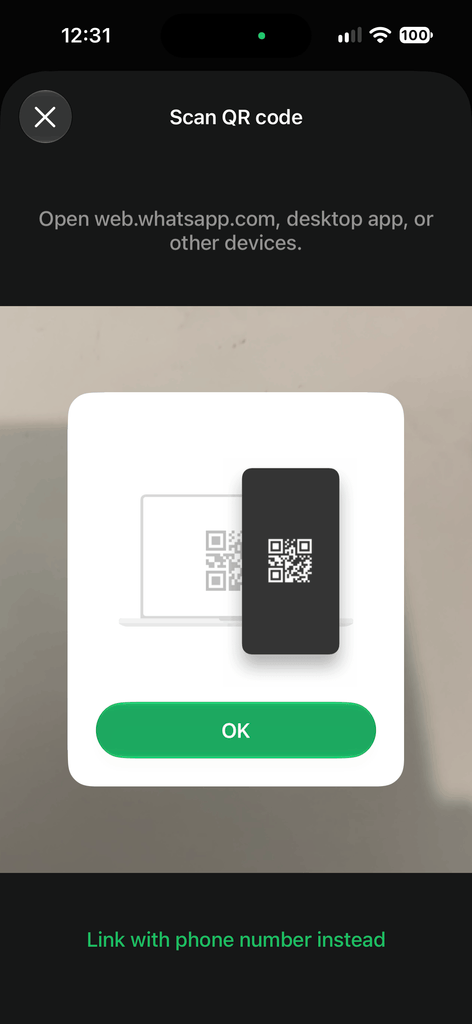
This is the sneaky one. Linked Devices lets you use WhatsApp on a computer or tablet, but a scammer can link their own device and quietly read your chats. Your phone keeps working normally, so you’d never notice.
Here’s how to check. It takes 30 seconds:
- Open WhatsApp.
- On iPhone, tap Settings. On Android, tap the three dots at the top right.
- Tap Linked Devices.
- Look at the list. Don’t recognise one? Tap it and choose Log Out.


Not sure about a device? Log it out anyway. You can always link your own computer again later.
Sign 5: A code you didn’t ask for, or you can’t log in at all
You get a six-digit WhatsApp code you never requested. Or you try to log in and it says your number is registered somewhere else, or asks for a PIN you never set.
An unexpected code doesn’t always mean you’ve been hacked. Sometimes someone typed your number by mistake. But it can also mean someone is trying to take over your account, so don’t share that code with anyone.
If you can’t get in at all, jump to Section 3.

2. Can Someone Hack Your WhatsApp?
Here’s the thing most people don’t realise: scammers rarely “hack” WhatsApp. There’s no clever software. They just persuade you to hand over access.
Each scam below works the same way. A message feels friendly or urgent, and you do what it asks. Here are the six I see most often.
Scam 1: “Can you send me that code?”
You get a six-digit WhatsApp code you didn’t ask for. A moment later a message arrives, often from someone you know: “Sorry, I typed your number by mistake. Can you send me the code?”
That code is the key to your account. If you send it, they can register your number on their phone and lock you out.
What to do instead: Don’t send it. If you want to be kind about it, reply: “I can’t share codes, but you can tap resend and enter your own number.” Real friends will understand.
Scam 2: Ghost pairing (the “vote for me” trick)
This is the one my family friend’s account was used for.
A message says something like “Can you vote for my daughter in this competition?” or “Is this you in this photo?” and includes a link. The site looks real. It asks for your phone number and shows a code, then tells you to “verify” it inside WhatsApp.
You’re not verifying anything. You’re approving a new linked device, and it belongs to the scammer.
From then on, they can read your messages while your phone looks normal. And they send the same request to your contacts, which is how it spreads.
What to do instead: Don’t tap links asking you to vote, verify or view a photo. If you’re unsure, call the person on their normal number and ask.
Here’s a government advisory on this scam if you’d like to read more.
Scam 3: A voice message from someone you love
You get a voice note that sounds exactly like your child: “Mum, I’m in trouble, I need money now.”
Scammers can copy a voice from just a few seconds of audio posted online. It builds on the old “Hi Mum” text scam, but a familiar voice makes it feel real.
What to do instead: Don’t send money based on a voice message. Call them on the number you already have saved. A great extra step is to agree on a family safe word that only your family knows. Ask for it whenever someone asks for money, even if it sounds like them.
Scam 4: The “invitation” file
A message arrives with a wedding invitation, delivery notice or document. On Android, it might be a file ending in .apk, which is an app installer. Once you open and install it, it can spy on what you do on your phone.
Simply receiving a file won’t hurt you. The risk starts when you open, download or install it.
What to do instead: Never install an .apk file sent over WhatsApp. If a file surprises you, even from a friend, message them separately to check they sent it.
Scam 5: Fake “WhatsApp Support”
Someone says they’re from WhatsApp and your account will be suspended unless you act now. They ask for your code, your PIN or a payment.
Real support doesn’t work like that. WhatsApp says it will never ask for your PIN or payment details.
What to do instead: Ignore the message. If you really need help, go through the official WhatsApp Help Centre. Never call a number a message gives you. Inside the app: Settings → Help → Contact Us
Scam 6: The urgent money request
A friend or relative says they’ve lost their wallet or need help with a bill, right now. It sounds like them and may even mention something personal.
But their account may have been taken over, or it could be a stranger pretending to be a family member on a new number.
What to do instead: Pause. Call them on their usual number before sending a cent. If you’ve already sent money, contact your bank straight away.
A simple rule that covers almost every scam
If a message asks you to vote, verify, forward, click, share a code or send money, and you weren’t expecting it, don’t do it. Check with the person another way first.
Scammers count on you being busy and wanting to be helpful. Taking a minute is your best defense.
Are you an easy target for hackers and scammers?
Take our free 2-minute Digital Safety Quiz and find out before they do. Start the Quiz
3. What to Do If Your WhatsApp is Hacked?
Take a breath. This is fixable, and the steps are simple. Go in order.
Step 1: Log back in
If you can still get SMS or calls on your number:
- Open WhatsApp and tap to log in.
- Enter your phone number.
- Ask for the six-digit code and type it in.
Logging back in with your number automatically logs out everyone else. Don’t share this new code with anyone, even if they say they’re WhatsApp.
Asked for a PIN you didn’t set? That means the scammer turned on two-step verification. WhatsApp’s recovery steps may ask you to wait seven days before you can get in. Follow the official account recovery instructions.
Step 2: Remove unknown devices
Go to Linked Devices (see Sign 4) and log out anything you don’t recognise.
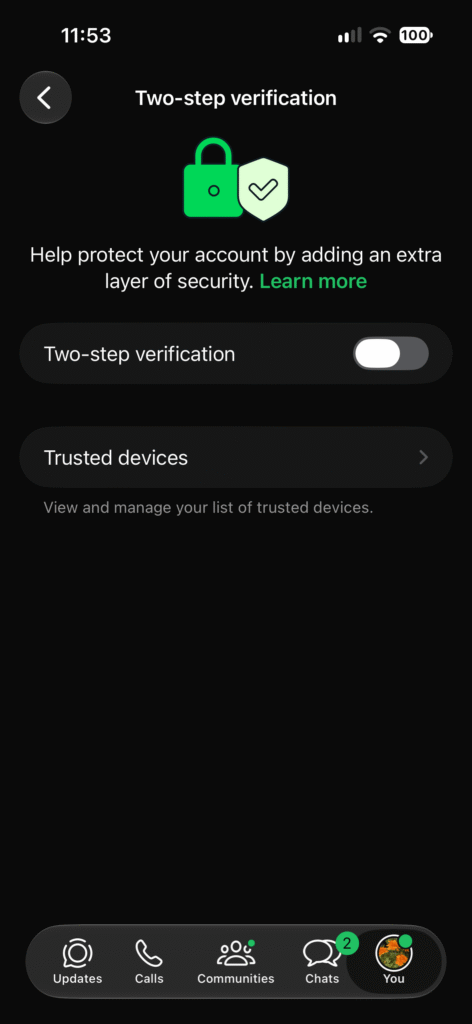
Step 3: Turn on Two-Step Verification
This is the single best lock for your account. Even if someone gets your code, they can’t get in without your PIN.
- Go to Settings > Account > Two-Step Verification.
- Tap Turn On and choose a PIN that isn’t easy to guess.
- Add a recovery email you can access, if WhatsApp offers it.
Menus change from time to time, so follow what you see on screen. Want a deeper walkthrough? See our guide to setting up multi-factor authentication.
Two-Step Verification settings


Step 4: Tell your contacts
Message or call your friends and family and say your account was hacked. Ask them to ignore odd messages from you, especially ones asking for money or to click something.
That one message could stop someone else being caught.
Step 5: Check your phone
If you only had a WhatsApp takeover, you usually don’t need to reset your phone. But if you installed a strange app or file:
- Look through your recently installed apps and remove any you don’t recognise.
- Update your phone and your apps.
- If your phone suddenly lost signal or your carrier says your SIM changed, call your provider right away.
If you think your email or Apple or Google account is at risk, secure those too. Worried about the phone itself? Read how to tell if your phone has been hacked.
Step 6: Still stuck? Use the official route
Use the WhatsApp Help Centre. Ignore anyone who messages offering to recover your account for a fee. That’s another scam.
Already tapped a suspicious link?
Don’t panic. Tapping a link doesn’t automatically mean you’ve been hacked. What matters is what you did next.
- Just opened it: Close the page and don’t enter anything.
- Typed in a password: Change the password, and anywhere else you’ve used it.
- Shared a code: Log back in right away, then check Linked Devices and turn on Two-Step Verification.
- Approved a device: Log it out in Linked Devices.
- Installed an app or file: Don’t open it. Remove the app if you can.
- Entered bank details or sent money: Call your bank straight away.
4. Your 2-Minute WhatsApp Lock-Down
You don’t have to be hacked to do this. Do it now while you’re here.
- Check Linked Devices. Log out anything you don’t know.
- Turn on Two-Step Verification. (Steps in Section 3.)
- Turn on Silence Unknown Callers. Go to Settings > Privacy > Calls. It won’t stop a takeover, but it cuts down on strange calls.
- Update WhatsApp. Updates often include security fixes.
- Use a strong screen lock. A good passcode stops someone who briefly picks up your phone from linking a device.
Then make Linked Devices a monthly habit. It takes 30 seconds.
5. WhatsApp Hacked FAQ
Can someone hack my WhatsApp without me knowing?
Yes. A linked device can sit quietly in the background while your phone works normally. That’s why a monthly Linked Devices check is worth the 30 seconds.
Can someone hack my WhatsApp just by sending me a message?
An ordinary message won’t hack you. The danger comes from what you do next: sharing a code, approving a device, opening a bad file or handing over personal details.
What happens if I share my verification code?
Someone can register your number on their phone and take over your account. If this happens, log back in right away with a fresh code, then follow Section 3.
Can they read my old messages if they take over my account?
Not automatically. WhatsApp says your past chats are stored on your device, so someone registering your number elsewhere can’t just pull them up. A linked device is different, because it can show messages in that session.
Does WhatsApp Support call people?
Be very careful with unexpected calls claiming to be WhatsApp. Don’t share your code, PIN or payment details.
Should I delete WhatsApp if I’ve been hacked?
No. Deleting the app won’t recover your account or remove the scammer’s access. Follow the recovery steps first.
6. You’ve Got This
Finding something odd in your WhatsApp is unsettling, but a few quick checks put you back in control. And every time you pause before tapping a link, you’re protecting yourself and the people who trust you.
Have you ever had a code you didn’t ask for, or a message that felt slightly off? Share it in the comments. Your story could be the warning someone else needs, and it helps all of us spot new scams faster.
If this helped, send it to someone who could use it, like your parents or a friend who’s a little too trusting online.
For more simple phone safety tips, visit our Phone Security Hub.
Related reading:
Codes to Check If Your Phone Is Hacked |
How to Tell If Someone Is Spying on Your Phone |
How to Tell If Your Facebook Account Has Been Hacked
Explore our curated Family Safety Toolbox: free tools and trusted products that help protect your data, prevent identity theft and keep your digital life safe at home or on the go.